
How to make Amazon main images with AI
Last updated: 2026-10-11
Short answer
Amazon's main image (MAIN) must be a real photo of the product on a pure white background (RGB 255,255,255), with the product filling 85% of the frame, no text, logos, watermarks or props not included, and no part of a mannequin; the longest side must be at least 1000 pixels to enable zoom. The fastest way to make a main image with MuseFrames is to choose the Amazon preset in “Background Remover”: the background and aspect ratio lock to white 1:1, at 1–3 credits per image.
If your original is a casual phone photo with poor lighting, first use “AI Photo Studio” to generate a studio-style image (1–3 credits each), set it as the hero image, then generate the “Amazon hero image” channel version: it outputs at 2000×2000 on white, at 1 credit per version. For secondary images, the Photo Studio's “E-commerce set” mode produces 4 at once (hero, detail, structure and scene); for detail images, use “Product Page Set”. Adult apparel and footwear have separate main image rules; see the table below.


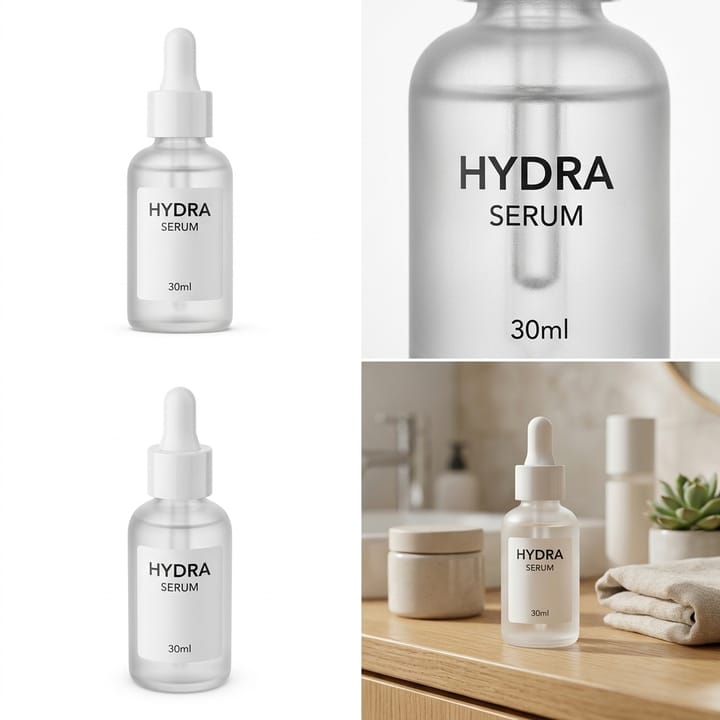

Official Amazon main image requirements (US)
| Item | Requirement |
|---|---|
| Background | Pure white, RGB 255,255,255Source 1 |
| Product fill | Product fills 85% of the frame, fully in frame and not cropped, showing only one product (plus included accessories)Source 1 |
| Size | Longest side at least 500 and at most 10000 pixels; 1000 pixels or more enables zoom (recommended)Source 1 |
| File format | JPEG (recommended), TIFF, PNG, non-animated GIF; RGB color mode recommendedSource 3 |
| Prohibited content | Text, logos, watermarks, borders, badges, props not included with the product, any part of a mannequin, placeholder imagesSource 1 |
| Apparel | Adult apparel must be shown worn by a standing model, at close to a 3:4 ratio; children's underwear and swimwear must be shown flat, without a modelSource 2 |
| Footwear | Single shoe, toe pointing left, at a 45-degree angleSource 1 |
| AI-generated people | Realistic AI-generated people must have the keyword contains-synthetic-performer added to the image metadata before uploadSource 1 |
Matching MuseFrames output specs
- Amazon hero image: 2000×2000, pure white background, product fills 85%
First make one image you like and set it as the hero image, then choose “Channel versions” on it: each version costs 1 credit and is output at the sizes above.
Which tools to use and how many credits they cost
Background Remover
1–3 credits per image (1K–4K)Cut out the product and switch to a pure white background; choosing the Amazon preset locks a white background and 1:1 aspect ratio. Supports batch processing and automatically fixes dust and scratches.
Open toolAI Photo Studio
1–3 credits per image (1K–4K)Turn casual snapshots into cleanly lit studio main images; “E-commerce set” mode generates 4 secondary images in one go: hero, detail, structure and scene.
Open toolProduct Page Set
1–3 credits per image (1K–4K)Generate 8 product page images at once, with selling-point copy localized for the target country and language; ideal for secondary images.
Open toolVirtual Try-On
2–6 credits per image (1K–4K)Adult apparel main images need a model wearing the item: put the garment on an AI model to generate a standing on-model shot.
Open toolMuseFrames charges in credits: 1 for a 1K image, 2 for 2K and 3 for 4K, with Virtual Try-On, Group Shot, Commercial Ad at 2×; video costs 15 credits for 5 sec and 45 credits for 15 sec.
Steps
- Prepare an original photo showing the whole product unobstructed; a phone photo is fine.
- Upload the image in “Background Remover”, choose Amazon as the platform preset, and generate a white-background image.
- If the original's lighting isn't ideal, use “AI Photo Studio” instead to generate a studio-style shot, and pick one to set as the hero image.
- On the hero image, choose “Channel versions” → “Amazon hero image” to get a 2000×2000 white-background image.
- Check that the product's colors, logo and label text match the real product; if the image contains a realistic AI-generated person, add the metadata tag Amazon requires before uploading to Seller Central.
FAQ
Can AI-generated images be used as Amazon main images?
Amazon requires main images to show the product for sale realistically and professionally, with proportions, quantity and color matching the real product. Every MuseFrames tool is instructed to keep the product's shape, colors, logo and label text unchanged, but please still check each point after generating; fix anything that doesn't match the real product with “Refine parameters” before uploading.
How white does an Amazon main image background need to be?
Pure white, RGB value 255,255,255. MuseFrames' Amazon channel version and Background Remover's Amazon preset both output a pure white background.
Can I add text or promotional badges to the main image?
No. Amazon prohibits text, logos, watermarks, borders and badges on main images. Selling-point copy can go on secondary images instead; generate them with Product Page Set.
Can ghost mannequin images be used as Amazon main images for apparel?
Amazon US requires adult apparel main images to be shown worn by a standing model, with no part of a mannequin visible. For adult apparel main images, we recommend generating on-model shots with Virtual Try-On or AI Model Studio; ghost mannequin images are better suited to channels that allow this format, such as your own online store.
How many credits does an Amazon main image cost?
Background Remover and the Photo Studio cost 1–3 credits per image (1K–4K), and channel versions cost 1 credit each. Your sign-up credits are enough to try a few first.
Sources
All pages below were accessed on 2026-10-11; prices and features may change at any time, so check the official websites for the latest.
- Amazon Seller Central: Product image guidelines: https://sellercentral.amazon.com/help/hub/reference/external/G1881
- Amazon Seller Central: Apparel image guidelines: https://sellercentral.amazon.com/help/hub/reference/external/G200498950
- Amazon Seller Central: Image file technical requirements: https://sellercentral.amazon.com/help/hub/reference/external/G9FUUH87RBNXGKB7
Try it with your own product photos
10 credits on sign-up · No credit card required
Start free